


It is important to build smarter schedules from the ground up, match techs to jobs by skill, group by geography, and shift from reactive to proactive dispatch. But even the best-built schedule develops holes. A customer cancels. A job finishes early. A part doesn’t show up and now you have a tech with a two-hour gap and nowhere to go.
How you respond to those gaps, and how prepared you are before they happen, is what separates a dispatch team that’s constantly scrambling from one that fills holes quickly and keeps the day on track.
Here’s how to build the systems and habits that make last-minute schedule changes a manageable part of the day instead of a crisis.
Build a Waiting List Before You Need One
The single most valuable tool for filling last-minute gaps is a well-maintained waiting list. But not all waiting list customers are the same and treating them as a single pool is a mistake that creates friction and erodes goodwill.
There are two distinct groups you need to track separately:
- Move-me-up customers are those who are scheduled for a future date but have explicitly said they’d take an earlier slot if one opens. They’re flexible on timing, they just want service sooner. These are your go-to calls when a gap appears. They’re already expecting to hear from you, and a same-day or next-day offer feels like a win for them.
- Day-specific customers are those who chose their appointment date deliberately; they arranged for someone to be home, they have a specific day off, or they’ve got a timeline they’re working around. Calling them at 7 a.m. to ask if they want to reschedule to today isn’t helpful; it’s disruptive. Keep these customers in your system, but off the fill-in call list.
The practical step: when you book an appointment, add a single question to your intake process: “If we have a cancellation and can get to you sooner, would you like us to call?” Most customers will tell you yes or no without hesitation. Log that preference in your job record and keep a running list of move-up customers by territory. When a gap opens in a specific zone, you’re pulling from a pre-sorted, pre-qualified list, not calling customers at random.
Know What Makes a Good Fill-In Job
When a gap opens up, the temptation is to grab the next new call that comes in and slot it in. Sometimes that’s the right move. But the best fill-in jobs aren’t always the newest ones on the board and dispatchers who know what to look for can fill gaps faster and more profitably.
Here’s what to assess when you’re evaluating candidates for an open slot:
- Parts-ready jobs waiting for installation. These are often the best fill-in candidates and frequently get overlooked. If a customer was quoted, approved a repair, and their part has come in, the only thing standing between them and a completed job is a tech visit. These jobs are already sold, already scoped, and require no diagnostic time. The tech knows exactly what they’re walking into. Check your pending-install queue every morning and flag any jobs where the parts are confirmed in stock and the customer’s been notified.
- Geographic fit. A fill-in job that sends your tech across town and back is often worse than leaving the gap empty. Filter your waiting list and open jobs by proximity to the tech’s current location or the surrounding stops. A short drive to a nearby job keeps the route efficient; a long detour kills the rest of the day.
- Skill and truck stock match. Confirm the tech assigned to the gap is qualified to handle the appliance type and likely repair. And check whether the job might require parts they’re not carrying. A fill-in job that turns into a “part needs to be ordered” visit wastes a slot that could have gone to something completable.
- Time available vs. job scope. Be realistic about what fits in the gap. A 90-minute opening isn’t the place for a complex multi-appliance diagnostic. Look for jobs that are either scoped for that timeframe or are likely to be straightforward based on what’s been described on the intake call.
- Customer reachability. The fastest fill-in candidate isn’t useful if you can’t confirm the customer will be home. Prioritize customers from your move-up list first since they’ve already said they want to be called. For new calls, confirm someone will be available before you schedule the job.
Create a Morning “Gap Readiness” Routine
The worst time to figure out how you’ll fill a gap is after the gap appears. Dispatchers who handle last-minute changes well have usually done some preparation before the day starts.
A simple morning check-in before dispatch goes out should include:
- Review the parts-ready queue. Which jobs have parts confirmed in and are waiting to be scheduled? Flag any that could fill a gap in today’s routes.
- Scan the waiting list by territory. Know which move-up customers are in each zone before a call comes in, not after.
- Identify any jobs at risk of running long or short. Jobs flagged as complex, or ones where a tech noted something unusual on the last visit, deserve a closer look. If a job is likely to run short, that creates a gap you can proactively plan to fill.
- Note any confirmed cancellations or reschedule requests that came in overnight. These should be removed from the board before the day starts so the schedule reflects reality.
This routine doesn’t need to take more than 10–15 minutes. But the dispatcher who’s done it arrives at the first cancellation of the day with a list of good options already in mind. That’s a very different experience than the one who’s starting from nothing.
Don’t Overlook Jobs That Are Already Partway Done

One of the most underutilized sources of fill-in work is your own job history. Beyond the parts-ready queue, there are other categories worth reviewing when you’re looking for work to slot in:
- Jobs that were diagnosed but the customer hasn’t responded to the quote yet. A gap in the schedule is a natural moment for a follow-up call. You’re not cold-calling — you’re telling a customer you have availability sooner than expected and their part could be ordered immediately if they want to move forward.
- Second visits for jobs that needed a return trip. If a tech flagged a job as requiring a follow-up — whether for an ordered part, an incomplete repair, or a concern that needed monitoring — and that job is geographically close to the open slot, it’s worth checking whether it’s ready to close out.
- Preventive or secondary appliances. Some customers mentioned a second appliance with a minor issue during a previous visit. If your notes captured that, a gap is an opportunity to reach out and see if they want to address it while you’re in the neighborhood.
These aren’t cold leads. They’re warm opportunities already in your system, and the right software will help you surface them quickly rather than relying on dispatchers to remember them from memory.
Set Up Your Software to Support Gap-Filling
A waiting list on a notepad and a mental catalog of which customers said they’d take an earlier slot will only take you so far. The businesses that handle schedule gaps well have typically built these workflows into their business management software.
In ServiceDesk, the DispatchMap gives your team the geographic and availability context to evaluate fill-in options in real time. When a gap appears, you can filter jobs in “waiting to schedule” and “wants sooner” in real-time on the dispatch map to identify best-fits for the current route.
Some specific things worth setting up:
- Use “Working to Schedule” status to filter jobs that have confirmed parts arrival and are in a queue for scheduling. You can use the “Jobs Perusal Form” (Shift+F7) to filter and cycle through jobs in this status.
- Use the Attention Notes (“AttnNote”) and “WantsSooner” indicator to identify the customers scheduling flexibility. The Attention Notes can be used to indicate that this appointment should not be rescheduled and the “Wants Sooner” indicator can be used to filter in the Jobs Persual Form.
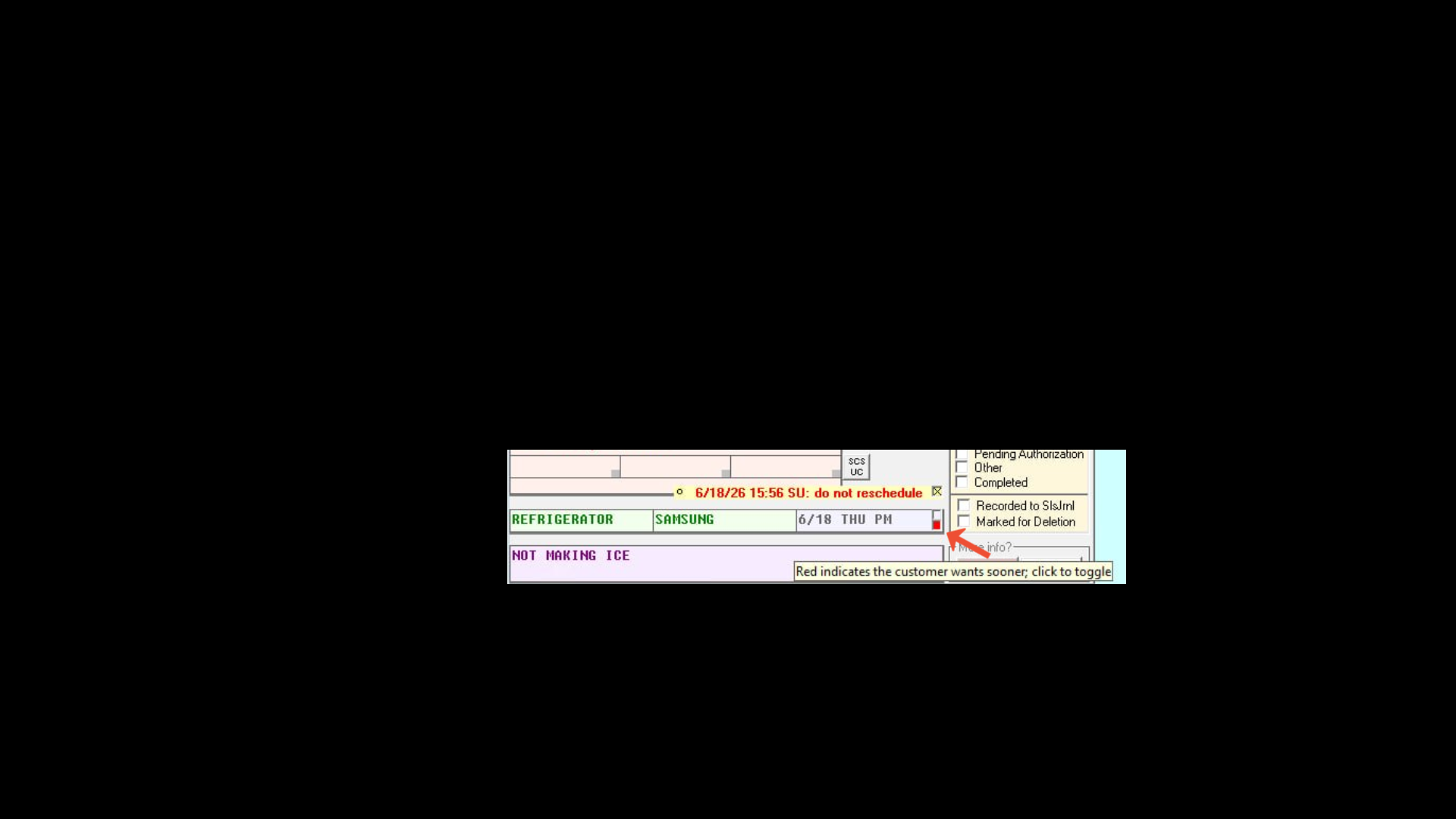
In the job record, Attention Notes (“AttnNote”) can be used to identify a customers preference of not rescheduling sooner; conversely, the red toggle box can be used to indicate when a person would like a sooner appointment should one become available.
- Jobs can be filtered by zone in the “Jobs Perusal Form” to identify geographic options for fill-ins.
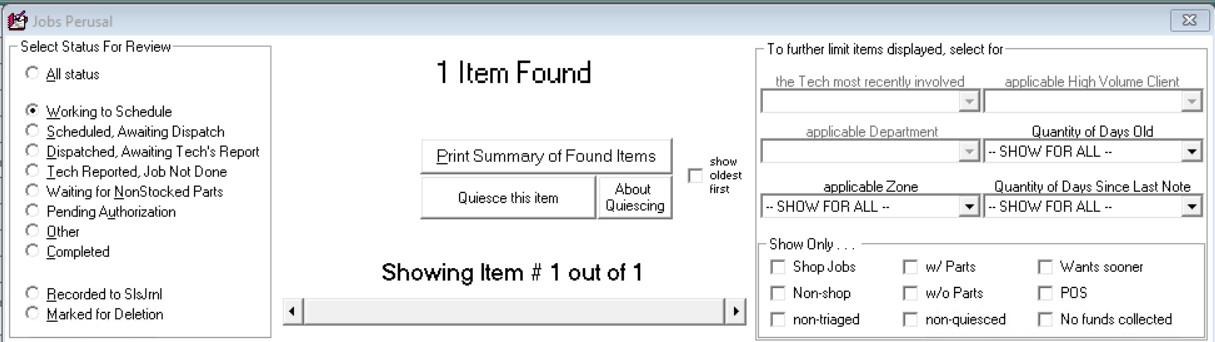
The Jobs Perusal Form (Shift+F7) can be used to filter jobs with a variety of different criteria. “Working to Schedule”, “Wants Sooner”, and geographic zones can be utilized here to find suitable fill-in jobs.
The Takeaway
Last-minute schedule gaps are inevitable. The businesses that absorb them well aren’t faster at reacting; they are better prepared. That means maintaining a segmented waiting list before you need it, knowing which jobs are already queued up and ready to go, and building a short morning routine that puts the right options in front of your dispatch team before the day gets moving.
Done right, a gap in the schedule stops being a problem and starts being an opportunity; to serve a waiting customer sooner, to close out a parts-ready job that’s been sitting, or to follow up on a lead that’s been lingering. The capacity was always there. The systems just have to be in place to use it.

